
Learn how to choose the right access point for multi-dwelling units with the right balance of coverage, capacity, Wi-Fi performance, security, seamless roaming, and future scalability.
In this article
- •Assess building layout and coverage requirements.
- •Choose APs based on coverage and device capacity.
- •Consider Wi-Fi 6/6E for high-density environments
- •Select the right frequency bands for performance.
- •Ensure reliable Ethernet and PoE connectivity.
- •Support seamless roaming across multiple APs.
- •Implement secure network segmentation.
- •Consider easy installation and maintenance.
- •Plan for future users, devices, and bandwidth needs.
Reliable Wi-Fi is essential in modern multi-dwelling units (MDUs), including apartment buildings, residential complexes, student housing, and condominiums. Residents expect fast and stable connectivity for streaming, remote work, online learning, gaming, smart home devices, and video calls.
However, providing reliable Wi-Fi across an MDU is more challenging than simply installing access points. High device density, thick walls, interference from neighboring networks, and different apartment layouts all affect wireless performance.
Choosing the right access point (AP) requires careful consideration of coverage, capacity, Wi-Fi technology, installation requirements, and network management.
What Is an Access Point?
An access point is a networking device that provides wireless connectivity to devices such as smartphones, laptops, smart TVs, cameras, and IoT devices.
In an MDU environment, multiple APs can work together to provide consistent Wi-Fi coverage across apartments and shared spaces. The right AP configuration helps reduce dead zones, improve performance, and support a growing number of connected devices.
1. Consider the Building Layout
Every MDU has a different structure. Before selecting an AP, consider the size and construction of the property.
Important factors include:
- Number of floors
- Number of apartments
- Apartment size and layout
- Wall and floor materials
- Corridors and common areas
- Indoor and outdoor spaces
- Existing network infrastructure
Concrete walls, reinforced floors, and other dense materials can significantly reduce wireless signal strength. A proper site survey can help determine the ideal number and placement of APs.
2. Choose APs Based on Coverage Requirements
Coverage requirements vary depending on the property.
For individual apartments, an AP may be installed inside each unit to provide dedicated coverage. For larger common areas, ceiling-mounted or wall-mounted APs can provide broader coverage.
AP placement should provide a strong and consistent signal without creating unnecessary overlap between neighboring access points.
The goal is not simply to maximize Wi-Fi range but to provide reliable coverage where residents actually use their devices.
3. Prioritize Capacity Along With Coverage
An AP may provide excellent signal strength but still perform poorly when too many devices connect to it.
In an MDU, a single apartment can have numerous connected devices, including:
- Smartphones
- Laptops
- Smart TVs
- Tablets
- Gaming consoles
- Smart speakers
- Security cameras
- Smart appliances
When selecting an AP, consider its client capacity and expected traffic levels. High-density environments benefit from APs designed to efficiently manage many simultaneous connections.
4. Select the Right Wi-Fi Generation
Modern Wi-Fi standards can improve performance and efficiency in high-density residential environments.
Wi-Fi 6 is particularly useful for MDUs because technologies such as OFDMA and improved scheduling help manage multiple connected devices more efficiently.
For environments with higher performance requirements, Wi-Fi 6E can provide access to the 6 GHz band where supported by local regulations and client devices.
When selecting an AP, consider both current requirements and future device growth.
5. Check Dual-Band or Tri-Band Support
The frequency bands supported by an AP affect performance and network capacity.
- 2.4 GHz: Longer range but generally more congestion.
- 5 GHz: Higher capacity and better performance for many modern devices.
- 6 GHz: Additional spectrum and potentially lower congestion with compatible Wi-Fi 6E devices.
A dual-band AP may be sufficient for many residential deployments, while tri-band or 6 GHz-capable solutions can be useful for high-density or performance-focused environments.
6. Evaluate Wired Connectivity and PoE
The AP is only one part of the network. Its wired connection should also be capable of delivering the required bandwidth.
Look for APs that support appropriate Ethernet speeds and Power over Ethernet (PoE) when centralized power and simplified installation are desired.
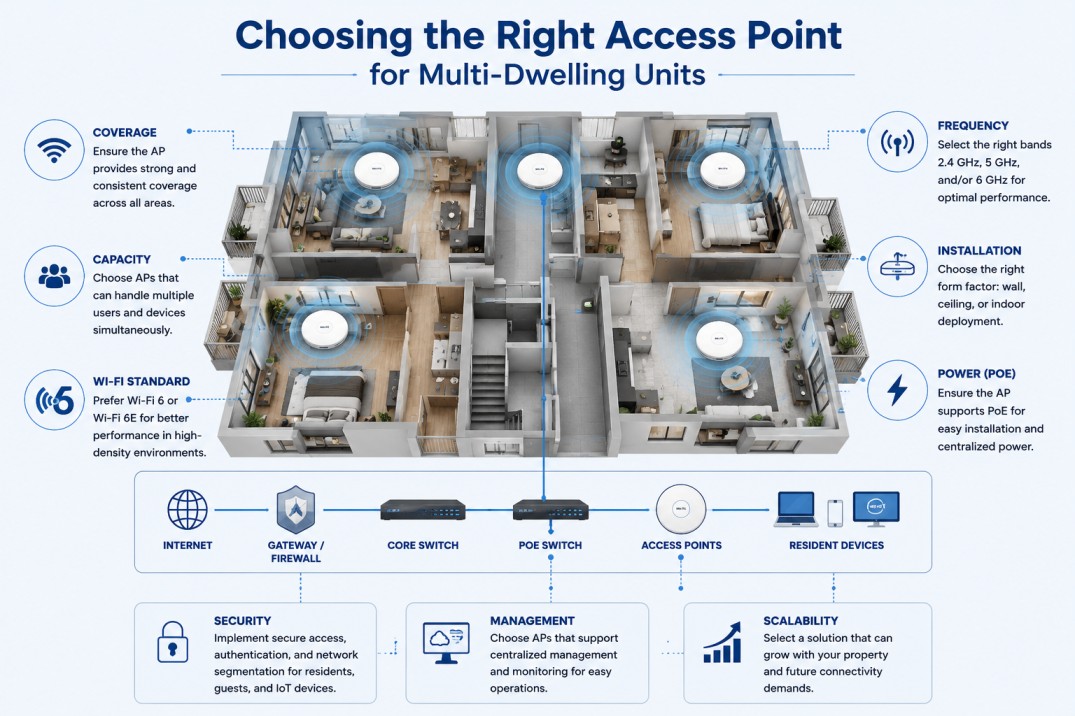
A typical MDU network may follow this structure:
Internet → Gateway/Firewall → Core Switch → PoE Switch → Access Point → Resident Devices
A reliable wired backbone helps prevent the AP from becoming a network bottleneck.
7. Look for Seamless Roaming
Residents may move between apartments, corridors, lounges, gyms, and other shared areas while remaining connected.
Features supporting client roaming can help devices transition between APs with minimal interruption. This is especially useful for video calls, voice applications, streaming, and mobile services.
For larger MDU deployments, centralized WLAN management can also make it easier to configure and optimize multiple APs.
8. Consider Network Security
Security is an important part of residential Wi-Fi design.
The selected AP should support appropriate security features and allow different types of users and devices to be separated.
For example, separate networks can be created for:
- Residents
- Guests
- Property management
- Security cameras
- Building IoT systems
VLANs, secure authentication, encryption, and firewall policies can help protect residents and building infrastructure.
9. Think About Installation and Maintenance
The physical design of the AP also matters. Ceiling-mounted, wall-mounted, and indoor APs may be suitable for different deployment scenarios.
Consider:
- Installation location
- PoE availability
- Cable requirements
- Accessibility for maintenance
- Environmental conditions
- Centralized management support
Easy-to-manage APs can reduce maintenance time, especially when hundreds of devices are deployed across a large residential property.
10. Plan for Future Growth
The number of connected devices in residential buildings continues to increase. Smart TVs, cameras, appliances, speakers, sensors, and other IoT devices can significantly increase network demand.
Instead of designing only for today's requirements, consider future growth when selecting APs.
A scalable solution should allow the network to support:
- More residents
- More connected devices
- Higher bandwidth applications
- Smart building technologies
- Future Wi-Fi standards
How to Choose the Right AP
Before purchasing an access point for an MDU, consider the following key factors:
Coverage: Determine how large the area is and how much Wi-Fi coverage is required.
Capacity: Consider how many users and devices will connect to the access point simultaneously.
Wi-Fi Standard: Choose the appropriate Wi-Fi technology, such as Wi-Fi 6 or Wi-Fi 6E, based on performance requirements.
Frequency: Evaluate whether the deployment requires 2.4 GHz, 5 GHz, 6 GHz, or a combination of frequency bands.
Installation: Select an AP suitable for the required installation type, such as wall-mounted, ceiling-mounted, or indoor deployment.
Power: Check whether the access point supports Power over Ethernet (PoE) for convenient installation and centralized power.
Security: Ensure the AP supports required security features, authentication, and network segmentation.
Management: Consider whether multiple access points can be centrally managed and monitored.
Scalability: Choose a solution that can support future growth in residents, connected devices, and bandwidth requirements.
Final Thoughts
Choosing the right access point for a multi-dwelling unit requires more than comparing wireless speed ratings. The best solution depends on the building layout, number of residents, device density, construction materials, coverage requirements, network infrastructure, and future needs.
By focusing on coverage, capacity, Wi-Fi technology, wired connectivity, security, roaming, and scalability, property owners and network administrators can build an MDU Wi-Fi network that delivers reliable connectivity today while remaining ready for tomorrow's demands.